To be a valuable global supplier
for metallic honeycombs and turbine parts


Contact number
0555-2813555
To be a valuable global supplier
for metallic honeycombs and turbine parts
Technological Innovation
Process Management
Continuous Improvement
Customer Satisfaction

Knowledge
Dedication
Diligence
Loyalty
Responsibility
Confidence
Tenacity
Respect

To be a valuable global supplier
for metallic honeycombs and turbine parts
Release time:2026-06-29
Server rooms are noisy places. Walk into any data center and you hear it – that constant roar of fans. Four to eight fans per server, ten to twenty servers per rack, thousands of racks in a facility. It adds up.
Most people think the noise comes from the fans themselves. That's part of it. But a lot of the noise is wind noise – the sound of air rushing through vents, grilles, and perforated panels. Turbulence. Air hitting sharp edges. The vent itself acting like a whistle.
If you're putting a shielding vent panel on a server rack or cabinet, you're adding another airflow path. Design it wrong, and you make the noise worse. Design it right, and you can actually reduce the noise.
Here's what we've learned about low wind noise design for server room shielding vent panels.
Where Wind Noise Comes From
When air moves through a vent, three things make noise.
Turbulence. Air doesn't flow smoothly through sharp-edged holes. It swirls, eddies, and separates from the walls. Turbulence creates pressure fluctuations. Those fluctuations become sound.
Vortex shedding. Air passing over an obstruction – like the edge of a perforated hole – creates tiny vortices that peel off and generate tonal noise. It's the same principle as a whistle.
Pressure drop. The harder the fans have to push, the more noise they make. If a vent creates high pressure drop, the fans spin faster. Faster fans = louder fans.
So low wind noise design is about three things: smoothing airflow, reducing turbulence, and minimizing pressure drop.
Why Honeycomb Beats Perforated Sheet
Perforated metal sheet is common on server cabinets. Cheap, easy to make, looks fine. But acoustically, it's terrible. The holes have sharp edges. Air hits them and creates turbulence. Noise levels go up.
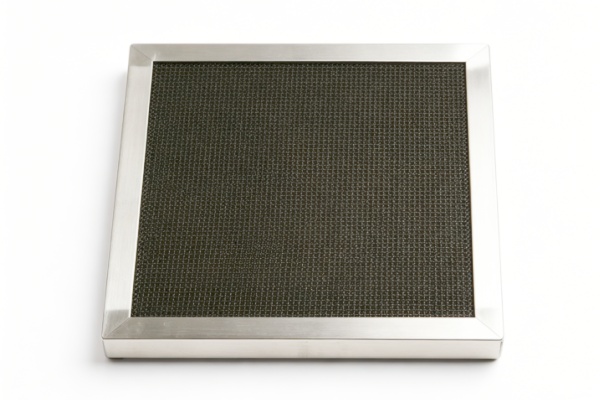
Honeycomb is different. The cells are straight, smooth channels. Air flows through them in a laminar fashion – no sharp turns, no sudden expansions. The straight pathways reduce turbulence and lower noise levels.
Honeycomb vents also have much higher open area – up to 95% in some designs. More open area means lower pressure drop. Fans don't have to work as hard. Less fan noise.
We've tested both. Same airflow, same fan. The honeycomb vent was noticeably quieter. Not a huge difference, but in a server room with dozens of racks, a few decibels matters.
The Airflow Path Matters
Even with honeycomb, how you mount the vent affects noise.
If the vent is flush with the cabinet surface, air flows straight in. Smooth. Quiet.
If the vent is recessed or has a protruding frame, air has to turn corners. That creates turbulence. More noise.
We recommend flush mounting for server room vents. Or at least a smooth transition from the cabinet surface to the honeycomb face.
Also, the air should hit the honeycomb face straight on, not at an angle. Angled airflow creates more turbulence. We align the vent with the fan's airflow direction whenever possible.
Cell Size and Depth – The Acoustic Trade‑Off
For EMI shielding, cell size determines frequency cutoff. Smaller cells shield higher frequencies.
For acoustics, smaller cells also help break up sound waves. The sound energy gets dissipated as it passes through the honeycomb structure. Some designs achieve 8‑11 dB noise reduction through this effect.
But smaller cells also create more airflow resistance. More resistance means higher pressure drop. Higher pressure drop means louder fans.
So there's a trade‑off. Smaller cells = quieter vent, but louder fans. Larger cells = louder vent, but quieter fans.
We usually land on 1/8‑inch cells for server room applications. Good balance between shielding, acoustics, and airflow. For the quietest possible setup, we go to 1/16‑inch cells, but we recommend checking the fan specs first to make sure they can handle the pressure drop.
Depth – Don't Overdo It
Deeper honeycomb provides more EMI shielding. It also provides more acoustic attenuation – the sound has more distance to travel through the cells.
But deeper honeycomb also means higher pressure drop. Fans work harder. More noise.
For server rooms, 1/2‑inch depth is the sweet spot. It provides enough shielding and some acoustic benefit without choking the fans.
We've seen customers spec 1‑inch depth for "maximum shielding." Their fans screamed. They ended up downgrading to 1/2 inch and the noise dropped significantly.
Open Area – More Is Quieter
The more open area a vent has, the lower the air velocity through the cells. Lower velocity means less turbulence and less noise.
A good honeycomb vent has 80‑95% open area. Perforated sheet is typically 30‑50%. That's a huge difference in air velocity.
At 200 CFM through a 12x12 vent, a perforated sheet might have air velocity of 500 feet per minute. A honeycomb vent with 85% open area might have 300 feet per minute. Lower velocity = less noise.
We push for maximum open area in server room vents. 85% minimum. 90% if the shielding requirement allows.
Gasket and Mounting – The Vibration Path
Sometimes the noise isn't from airflow. It's from vibration. The fan vibrates, the cabinet vibrates, and the vent panel vibrates. That vibration radiates as sound.
A good conductive gasket does more than seal RF. It also dampens vibration. The gasket material absorbs some of the mechanical energy before it turns into noise.
We use silicone or rubber gaskets for server room applications. They provide both EMI sealing and vibration damping.
Also, mounting screws matter. If they're loose, the panel rattles. If they're too tight, the frame warps and the gasket loses contact. We specify torque values for every installation.
Real Example – Data Center Retrofit
A customer had a server room with perforated sheet vents on their racks. The room was loud – over 75 dB at the rack face. They were getting complaints from staff.
We replaced the perforated vents with 1/8‑inch honeycomb vents, 1/2‑inch depth, 85% open area, flush mounted with silicone gaskets. Same fans, same racks.
The noise level dropped 6‑8 dB. Staff reported the room felt noticeably quieter. The fans were still running, but the wind noise from the vents was significantly reduced.
Real Example – New Build
A customer building a new server room wanted the quietest possible setup. They worked with us on the vent design.
We used 1/16‑inch honeycomb cells, 1/2‑inch depth, 90% open area, with a smooth flush mount and a soft gasket. We also recommended larger vents than they originally planned – more area = lower velocity = less noise.
The room came in at under 65 dB at full load. That's quiet for a server room. The customer was happy.
Summary – Low Wind Noise Checklist
If you're designing a shielding vent panel for a server room, here's what we recommend.
Use honeycomb, not perforated sheet. Smoother airflow, less turbulence.
Maximize open area. 85% minimum. 90% if possible.
Keep depth to 1/2 inch. More depth kills airflow and increases noise.
Match cell size to your frequency needs. 1/8‑inch for most. 1/16‑inch only if you need high frequency shielding and have fan budget.
Flush mount. No recessed frames or sharp transitions.
Use a soft gasket. Dampens vibration and seals RF.
Larger vent area = lower velocity = less noise. If space allows, make the vent bigger.
Test. Put a sound meter near the vent. Listen for whistling or turbulence. Adjust if needed.
Bottom Line
Server room noise isn't just a nuisance. It affects staff comfort, concentration, and even health over time.
Wind noise from vents is a significant contributor. But it's fixable. With the right honeycomb design – proper cell size, depth, open area, and mounting – you can cut noise without sacrificing cooling or shielding.
We make shielding vent panels for server rooms. We've seen what works and what doesn't.
If you're tired of the roar, talk to us. We'll design a vent that keeps your gear cool, your data secure, and your ears happy. That's what we do.