To be a valuable global supplier
for metallic honeycombs and turbine parts


Contact number
0555-2813555

To be a valuable global supplier
for metallic honeycombs and turbine parts

Technological Innovation
Process Management
Continuous Improvement
Customer Satisfaction

Knowledge
Dedication
Diligence
Loyalty
Responsibility
Confidence
Tenacity
Respect

To be a valuable global supplier
for metallic honeycombs and turbine parts
Release time:2026-06-01
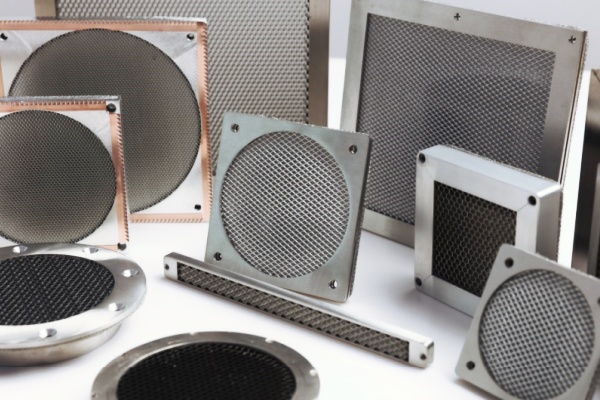
If you've ever seen a honeycomb type high screen efficiency ventilation window, you probably thought it's just a piece of metal with a bunch of little holes. Looks simple. But there's more to it than that.
Get the cells wrong, and you either leak RF or choke your fans. Get it right, and you get both good airflow and solid shielding.
We make these things. Here's what you need to know.
Why Honeycomb Instead of Mesh or Perforated Sheet
Wire mesh is cheap. Perforated sheet is cheap. They both have two problems.
First, open area is low. Mesh might be 50-60%. Perforated sheet is often 30-40%. That means your fans work harder. Equipment runs hotter.
Second, they don't shield at high frequencies. At 1 GHz, a piece of mesh might give you 10-20 dB. At 5 GHz, almost nothing.
A honeycomb vent is different. The cells are deep – usually 1/2 inch or more. That depth creates a waveguide effect. RF above a certain frequency can't get through. Air goes right through because air molecules don't care.
Open area is 80-90% for most honeycomb. That's way better than mesh. So you get real shielding and good airflow.
The Three Things That Matter
Cell size, depth, and material.
Cell size controls what frequencies get blocked. Smaller cells block higher frequencies. But smaller cells also mean less open area.
Depth controls how much attenuation you get. Deeper cells shield better. But deeper cells also mean higher pressure drop – your fans have to push harder.
Material is simple. Aluminum for indoors. Stainless for outdoors, especially near salt. That's it.
Picking Cell Size by Frequency
We get asked this all the time. What cell size do I need?
Quarter‑inch cells – cutoff around 600 MHz. Good for low frequencies. Open area about 90%. Airflow is great. Shielding at 1 GHz is decent, at 2 GHz starts to drop.
1/8‑inch cells – cutoff around 1.5 GHz. This is the workhorse. Works for most telecom, 4G, Wi‑Fi. Open area about 85%. Good balance.
1/16‑inch cells – cutoff around 3 GHz. For 5G, radar, satellite. Open area drops to 75-80%. Airflow starts to hurt. Don't use this unless you really need it.
If your problem is at 2.4 GHz, 1/8‑inch is fine. You don't need 1/16‑inch. Over‑spec kills airflow for no reason.
Depth – The Underrated Knob
Most people look at cell size and stop. They forget depth.
A 1/2‑inch deep vent is standard. At 5 GHz, a 1/8‑inch cell, 1/2‑inch deep vent might give you 35 dB. Same cell size at 1‑inch depth might give you 55 dB.
So if you need more shielding at a given frequency, go deeper. But pressure drop roughly doubles. Your fans will notice.
We've had customers who needed 60 dB at 6 GHz. 1/8‑inch cells wouldn't cut it, even at 1‑inch depth. We went to 1/16‑inch cells, 1‑inch depth. Shielding hit 65 dB. But they had to upgrade their fans.
Material – Aluminum vs. Stainless
Aluminum is light and cheap. Works fine indoors. But put it outside, especially near the coast, and it corrodes. White powder forms. The gasket loses contact. Shielding drops.
Stainless 304 is better. 316L is best for salt environments. Costs more, weighs more, lasts longer.
We always ask customers: is this going outdoors? If yes, stainless. If it's near salt water, 316L. No exceptions.
The Gasket – Where Most Leaks Happen
You can have the perfect honeycomb. But if the gasket between the vent and your cabinet fails, RF leaks around the edge.
We see this all the time. People bolt the vent straight to painted metal. No gasket. Or they use foam weatherstrip – not conductive. Or they forget to scrape the paint off the mounting surface.
The fix is simple. Use a conductive gasket – silver‑filled silicone or beryllium copper. Make sure the surface is bare metal. Torque to spec.
We've fixed more "bad vents" by scraping paint than by replacing honeycomb.
Real Example – Telecom Cabinet
A telecom customer had a cabinet with 1/4‑inch cell vents. They were having interference at 2.4 GHz from a nearby Wi‑Fi access point. 1/4‑inch cells are weak at 2.4 GHz.
We swapped in 1/8‑inch cell vents, same depth. Open area dropped from 90% to 85% – fans didn't care. Shielding at 2.4 GHz went from 20 dB to 55 dB. Interference gone.
They didn't need 1/16‑inch. That would have been overkill and hurt airflow.
Real Example – Outdoor Radar
Another customer needed a vent for an outdoor radar at 9 GHz. Coastal site. They tried aluminum 1/8‑inch vents. Corroded in a year. Shielding at 9 GHz was only 20 dB.
We built a stainless vent with 1/16‑inch cells, 1‑inch depth, silver‑filled silicone gasket. Shielding hit 60 dB at 9 GHz. Stainless didn't corrode. Cost more, but it lasted.
When You Don't Need Honeycomb
If your highest frequency is below 300 MHz, a waveguide vent isn't the right tool. You need ferrite, conductive paint, or a solid shield.
If you have no shielding requirement at all, just use a louver or perforated sheet. Save your money.
But if you need to block RF above a few hundred MHz and still move air, honeycomb is the only answer.
How to Test Your Vent
You can't see shielding. You have to measure it.
Get a near‑field probe and a spectrum analyzer. Put the probe at the edge of the vent. Move it around. If you see spikes, you have a leak.
Check the gasket first. Then check for paint. Then check the torque.
If the vent itself is bad – wrong cell size or damaged honeycomb – you'll see leakage across the whole face, not just the edges.
A honeycomb type high screen efficiency ventilation window is the best tool for balancing airflow and shielding.
Pick the right cell size for your frequency. 1/8‑inch for most. 1/16‑inch for 5G and radar. Quarter‑inch for low frequencies and max airflow.
Match depth to your shielding need. 1/2 inch for most. 1 inch for high attenuation.
Use stainless outdoors. Use a conductive gasket. Scrape the paint.
We make these. We test them. We've seen what works and what doesn't.
If you need a vent that breathes and blocks, tell us your frequency and your airflow. We'll build the right one. No guesswork. That's what we do.